
- All products
- Trending
-
Shop by Category
- Acrylic displays
- Brochure holders
- Notice boards & Corkboards
- A frames & Pavement signs
- Poster & Sign frames
- Glass display showcases
- iPad stands
- Clip frames & Snapframes
- Poster stands
- Queue & Crowd barriers
- Shopline store fixtures
- Exhibition displays
- Hospitality industry displays
- Charging stations
- TV stands & Digital signage
- Display & Artist easels stands
- Lecterns & Podiums
- Museums displays & Gallery displays
- Safety range
- Poster light boxes & Displays
- Paper display furniture
- Sit stand desks
- Menu blackboards
- Flag banners & Event flags
- Outdoor cigarette bins
- Whiteboards
- Retractable banners
- Sign shop supplies
- Real estate signs
- Digital signage solutions
- Church & Community signs
- Office & Corporate supplies
- Window displays
- Outdoor displays & Signage
- Pos signs / Ticket holders
- Hardware & Accessories
- Hand sanitising stations
- Cable hanging systems
- Educational displays
- Chalkboards & Marker boards
- Business support essentials
- Custom print service
- Specials
- Customer service

How to Add, Remove, and Adjust Accessories on Modular Sage Poster Stands?
01/10/2025
Share the Post:


Modular Sage Poster Stands are versatile and adaptable display systems designed for exhibitions, retail stores, and other promotional spaces. They support various accessories such as poster holders, brochure holders, banners, and notice boards, allowing businesses to customise their displays according to their marketing needs.
Adding Accessories
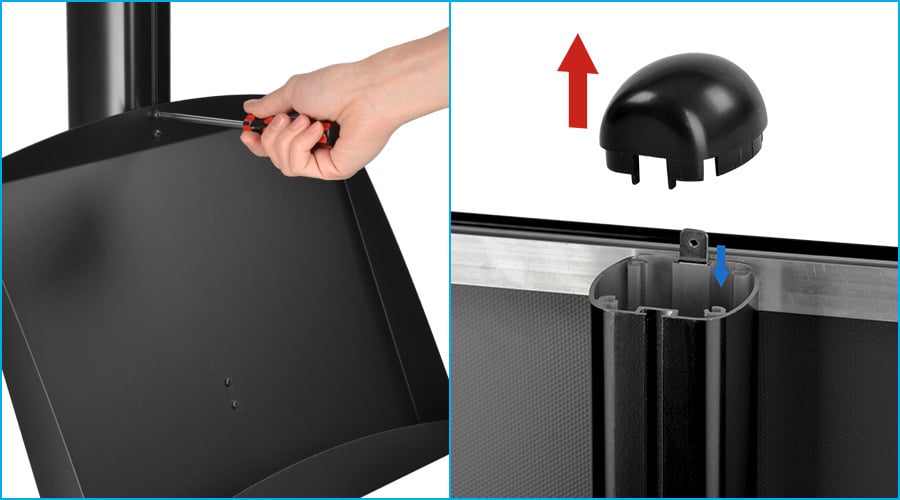
- Remove the Cover
- Start by removing the cover at the top of the pole.
- This will expose the grooves where the screws and connectors
- Insert Screws & Connectors
- Slide the screws and connectors along the grooves in the pole.
- Ensure they are positioned roughly where you want the accessory to be attached
- Attach the Accessory
- For a clip frame or other Sage accessories, loosen both connectors (washers) attached to the back of the frame.
- Slide the connectors along the channel to the desired position.
- Secure the Accessory
- Slide the screws and connectors along the grooves in the pole.
- Ensure they are positioned roughly where you want the accessory to be attached
Remove the Accessories
- Loose the Screws
- Using an appropriate tools,lossen the screws
- Slide the Accessory Down
- Once the screws are loose, slide the accessory down or out of the pole’s channel.
- Remove Screws and Connectors
- Slide out the screws and connectors if you no longer need them in the pole.
- Replace the Cover
- If no more modifications are required, reattach the top cover of the pole.
Adjusting Accessory Height
- Loose the Screws
- Use a tool to slightly loosen the grub screw, which allows the ccessory to move freely.
- Slide the Accessory to the New Position
- Move the accessory up or down along the pole’s channel to the new desired height.
- Tighten the Screw
- Secure the accessory in place by tightening the screw from the front.
Additional Tips
- Double-Sided Display
The Modular Sage Poster Stand features channels on both sides of the pole, enabling you to attach accessories on both the front and back for enhanced visibility. - Stable Base
The display stand features a heavy cast-iron base, ensuring stability and preventing accidental toppling.
By following these steps, you can efficiently customise your Modular Sage Poster Stand to best suit your promotional needs.
